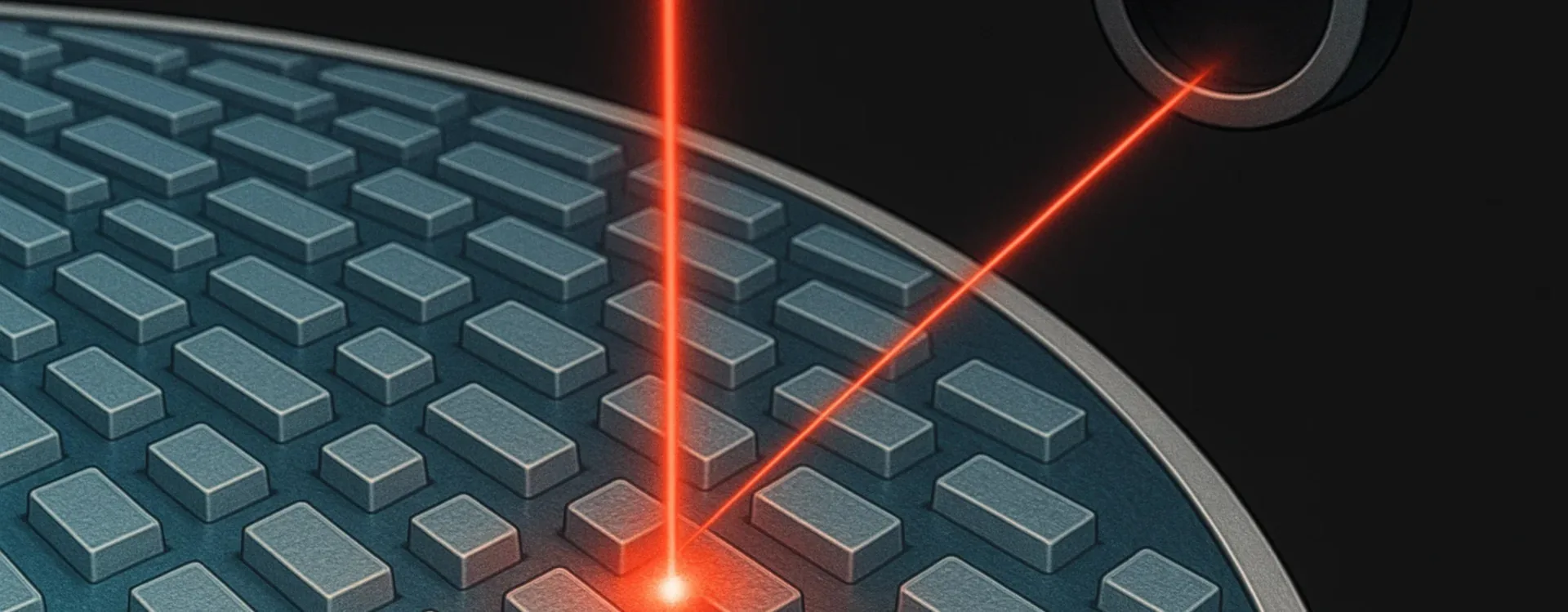
An audio CD does not store sound directly like a vinyl record does. Instead, it stores numbers. A laser reads these numbers, the electronics turn them into a sound wave, and then the amplifier and speakers do the rest. In this article we walk through, step by step, how an audio CD works, using language that a high school student can follow, without losing depth.
1. From sound to numbers, and from numbers back to sound
We can summarize how a CD works as a chain of transformations:
- In the studio, sound is converted into numbers (digital audio).
- These numbers are written to the CD as a long sequence of bits (0s and 1s).
- In the CD player, a laser reads these bits as it follows a spiral of microscopic pits.
- The electronics reconstruct the numbers (audio samples) in the correct order.
- A DAC (Digital to Analog Converter) turns the numbers into a continuous electrical waveform.
- The amplifier and speakers turn that electrical wave into air vibrations → music.
Unlike vinyl, where the stylus follows a physical groove that is directly a “snapshot” of the sound wave, with a CD the sound wave is reconstructed from digital data.
2. Physical structure of an audio CD
An audio CD is made up of several layers:
- a transparent plastic base (polycarbonate),
- a very thin reflective metal layer (usually aluminum),
- a transparent protective coating,
- the printed label with title and artwork on top.
Inside the polycarbonate there is a spiral of microscopic indentations, made of:
- pits – tiny indentations,
- lands – the flat areas between pits.
This spiral is continuous and unique, and it winds from the center of the disc towards the outside (the opposite of vinyl, which goes from the outer edge to the center). You cannot see any of this with the naked eye, but for the laser the difference in reflection between pits and lands is crucial.
3. Pits and lands: how bits are represented
It is important to understand that on a CD it is not as simple as “one pit = 1, one land = 0”. The encoding is more sophisticated:
- what matters is not the pit by itself, but the transition from pit to land (or land to pit);
- each change in reflection is interpreted and converted into a sequence of bits.
The laser illuminates the spiral. The reflected light:
- behaves in a certain way on the lands,
- behaves differently on the pits, because of the height difference and light interference.
A photodiode continuously measures how much light comes back. Whenever the light level changes (pit → land or land → pit), the electronics detect this and turn it into a change in bits. In practice, the spiral of pits and lands is like a continuous microscopic barcode.
4. The laser and optical system in a CD player
Inside a CD player you will find:
- a laser diode (infrared, around 780 nm),
- a system of lenses that focuses the beam on the reflective layer,
- a photodiode that collects the reflected light,
- a servo-control system that keeps focus and follows the spiral track.
The reading process works like this:
- The disc spins, but not always at the same speed: the player constantly adjusts rotation to keep the linear data rate under the laser constant.
- The laser is aimed at the spiral of pits and lands.
- The reflected light returns to the photodiode.
- Microscopic variations in reflected light are converted into an electrical signal that fluctuates.
- The electronics “clean up” and interpret this signal, reconstructing the sequence of 0s and 1s.
Compared to a turntable:
- there is no mechanical contact with the data surface,
- there is no physical stylus that wears out and wears down the medium.
5. From pits to bits: EFM modulation
Data on a CD are not stored as a simple raw stream of 0s and 1s. For reliability, stable reading and effective error correction, special encoding techniques are used.
One of the most important is EFM (Eight-to-Fourteen Modulation):
- each group of 8 data bits is converted into a 14-bit code word based on a fixed lookup table;
- between adjacent code words, a few merge bits are inserted;
- the goal is to avoid sequences that are too long without transitions, which would make it hard to keep the reading clock and synchronization stable.
The result is that the shape and length of the pits do not directly represent the audio numbers, but a modulated version of the data, designed specifically to ensure reliable reading.
6. Digital audio format on CD: 44.1 kHz and 16 bit
Audio CDs follow a standard known as the Red Book, which defines key parameters:
- Sampling rate: 44.1 kHz → 44,100 samples per second for each channel (left and right).
- Bit depth: 16 bits → each sample can take 65,536 possible values.
6.1 What it means to sample a sound
Real sound is an analog wave, continuous in time. To convert it into numbers we use sampling:
- We take the analog signal (for example, from a microphone).
- We measure its amplitude many times per second (the samples).
- Each measurement is converted into an integer within a certain range (from 0 to 65,535 for 16-bit audio).
If you sample fast enough (44.1 kHz) and with enough precision (16 bits), you can reconstruct a waveform that, to the ear, is practically indistinguishable from the original within the audible band (roughly 20 Hz–20,000 Hz).
6.2 Why 44.1 kHz?
According to the Nyquist theorem, to represent a signal without ambiguity you must sample at least at twice the maximum frequency you want to reproduce.
- The human ear (in theory) goes up to around 20 kHz.
- So you need at least 40 kHz.
- 44.1 kHz is sufficient and suited the digital recording technology available when the CD standard was defined.
7. Scratches, errors and correction: the role of CIRC
One of the big strengths of CDs compared to vinyl records is error correction. Audio data are not stored in a simple continuous order, but:
- interleaved (mixed and spread out),
- accompanied by redundant information that allows error detection and correction.
A key system is CIRC (Cross-Interleaved Reed-Solomon Code):
- it distributes the data so that a physical scratch affecting one small area results, at the data level, in many tiny errors spread over time;
- it uses redundancy to detect which bits are wrong and correct them;
- when full correction is not possible, the player can interpolate some missing samples, making the error barely noticeable to the ear.
In practice:
- small scratches → often you hear no difference at all;
- serious scratches → clicks, skips, dropouts… but as long as the damage is moderate, the audio often remains surprisingly intact.
8. From bits back to sound: DAC, filter and amplifier
Once the player has:
- read pits and lands,
- decoded EFM,
- applied CIRC,
- reassembled the bit sequence in the exact order,
it ends up, at each instant, with two numbers:
- one for the left channel,
- one for the right channel.
These numbers are sent to the DAC (Digital to Analog Converter):
- the DAC takes the digital numbers (samples);
- it turns them into an analog electrical signal (a voltage that varies over time);
- a low-pass filter removes unwanted high-frequency components produced by the conversion process;
- the clean analog signal is sent to the amplifier.
From this point on the path is similar to vinyl: the amplifier boosts the signal power, and the speakers convert it into cone movement and air vibrations.
9. Main advantages of audio CDs (especially versus vinyl)
9.1 No mechanical contact with the data surface
On a turntable, the stylus physically touches the groove, gradually wearing down both stylus and record. With a CD:
- the laser reads the data through the plastic layer, without touching the data layer,
- if the disc is handled with care, reading quality remains almost unchanged over time.
9.2 Very low background noise
Vinyl always comes with some inherent surface noise: hiss, clicks, crackle caused by dust, micro-scratches, static electricity. A clean CD, by contrast, has a background noise level very close to zero: you essentially hear only what was recorded.
This allows:
- a wider dynamic range,
- more detail in very quiet passages.
9.3 Precision and stereo stability
On a CD, the signals for the left and right channels are:
- numerically exact,
- stable over time, with no mechanical wear that could change them.
The result is a very precise and stable stereo image.
9.4 Resistance to vibrations and everyday convenience
A turntable is quite sensitive to vibrations (floor movement, bumps, handling). A CD player, within limits, can:
- use memory buffers to absorb brief interruptions in reading,
- keep playing even with small shocks.
With a CD you can also:
- jump directly to the desired track,
- see the elapsed or remaining time,
- pause and resume from the exact same point.
9.5 Copying and archiving
Because CDs are digital:
- you can make bit-perfect copies that are identical to the original;
- you can rip a CD to a computer with no loss of quality (given proper settings);
- you can use CDs as a source for high-quality digital audio archives.
10. The limits of CDs
For a fair comparison, we should also mention some limitations:
- CDs are vulnerable to deep scratches or damage to the reflective layer: beyond a certain point, error correction is no longer enough.
- Perceived quality depends heavily on how the disc was mastered (too much dynamic compression leads to a “loud” and fatiguing sound).
- Some listeners find digital sound “colder” or less “physical” than vinyl, although this depends on many factors: playback system, mastering choices, personal taste.
11. CDs and vinyl compared (in brief)
Linking this article to the one about turntables, we can summarize:
- Vinyl: physical groove → stylus vibrates → cartridge generates an analog signal → amplifier → speakers. Everything stays in the analog domain, with a strong “physical” charm, but greater sensitivity to wear and noise.
- CD: pits and lands → laser reads bits → digital reconstruction (44.1 kHz / 16-bit) → DAC → analog signal → amplifier → speakers. The sound is reconstructed from numbers, with extremely low noise floor, error correction and great long-term stability.
12. Glossary of acronyms and technical terms
12.1 Acronyms
- CD (Compact Disc) – Optical disc format read by a laser, used for audio and data.
- PCM (Pulse Code Modulation) – System for representing an analog signal as a sequence of numbers (samples).
- DAC (Digital to Analog Converter) – Device that turns digital numbers into a continuous analog electrical signal.
- EFM (Eight-to-Fourteen Modulation) – Modulation technique that converts 8-bit data bytes into 14-bit code words to make reading and synchronization easier.
- CIRC (Cross-Interleaved Reed-Solomon Code) – Error-correction scheme used on audio CDs.
- Hz (Hertz) – Unit of frequency: 1 Hz = 1 cycle per second.
- kHz (kilohertz) – 1,000 Hz; CD sampling rate is 44.1 kHz.
- dB (decibel) – Logarithmic unit used to express level ratios, often referring to dynamic range.
12.2 Technical terms
- Bit – Basic unit of digital information, can only take two values: 0 or 1.
- Sampling – Process of periodically measuring the amplitude of an analog signal to convert it into numbers.
- Sampling rate – Number of samples taken per second (for CDs: 44.1 kHz).
- Bit depth – Number of bits used to represent each sample (for CDs: 16 bits).
- Pit – Tiny indentation in the reflective layer of a CD.
- Land – Flat area between pits.
- Photodiode – Light-sensitive component that generates current when light hits it; in a CD player it measures reflected light.
- Servo-control – Electronic system that adjusts laser position, focus and disc rotation speed.
- Dynamic range – Difference between the lowest and highest levels a system can reproduce without excessive noise or distortion.
- Mastering – Final stage of audio production in which volume, tonal balance and dynamics are optimized before pressing to CD or cutting to vinyl.